ADR guide: how to record a decision
This page explains how architecture decision records (ADRs) are written and maintained in KBP: the file conventions, the metadata, the status lifecycle, and the template. The records themselves are the other pages of this section; the section page shows them as a decision log on the published site.
When to write an ADR
Write an ADR for a decision that is hard to reverse, affects more than one team or component, or that a future reader would otherwise have to reconstruct from code and chat history. Typical triggers are choosing or replacing a framework, library, hosting model, integration pattern, security mechanism, or a team process that shapes the code. Small implementation choices belong in code comments or the relevant Arc42 section, not here.
A record is also the right place for a decision that was rejected. The reasoning is often more valuable than the outcome.
File conventions
- One Markdown file per decision in
09-Architecture-Decisions/, named09.NN-Short-Title.mdwith the next free number. The number is the decision ID:09.02-...is referred to as ADR 9.2 in text, commits, and pull requests. Never renumber or reuse a number. - The file opens with a single
#title written as a short statement of the decision, for example Automate dependency update proposals with Renovate. No YAML front matter, as for every page underdocs/. - The metadata is a bullet list directly below the title (see next section). The site build lifts it into the page header and the decision log; the wiki renders it as a list.
- Links follow the Arc42 rule: relative links only to files inside
docs/architecture/arc42/and never starting with../, except for files in/images/; absolute wiki or repository URLs for everything else. Within this folder, link to another record by file name, for example[ADR 9.1](09.01-Auth.md). - Add the new record to the contents list of the Arc42 landing page.
Metadata
| Key | Required | Value |
|---|---|---|
Status |
yes | One of the statuses below, lower case. |
Date |
yes | ISO date YYYY-MM-DD of the last status change. Free text such as unknown (before 2026-08-17) is allowed for retrofitted records. |
Deciders |
yes | Roles or names of the people who made the decision. |
Consulted |
no | People whose opinions were sought. |
Informed |
no | People kept up to date. |
Tags |
no | Comma-separated keywords, for example security, dependencies. They appear as chips in the log. |
Supersedes |
no | Link to the record this one replaces, for example [ADR 9.1](09.01-Auth.md). |
Superseded by |
no | Link to the record that replaced this one. |
Keys are case-insensitive. Any other bullet directly below the title ends the metadata block, so keep the list together and start the body with a blank line and a heading.
Status lifecycle
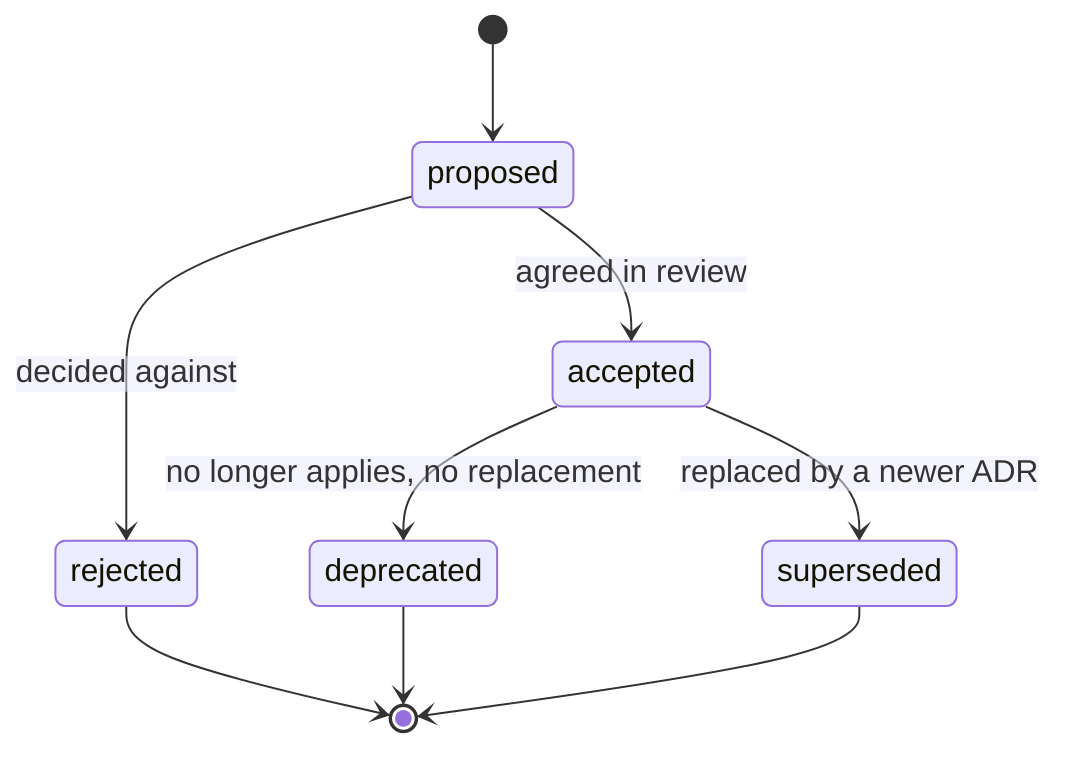
| Status | Meaning | Editing rules |
|---|---|---|
proposed |
Draft under discussion. Not binding. | Edit freely; discussion happens in the pull request or in review comments. |
accepted |
Binding for new and changed code. | Content is frozen except for typo fixes and the status fields. A change in direction is a new record. |
rejected |
Considered and decided against. Kept so the reasoning is not lost. | Frozen. Add a short note under Decision outcome on why it was rejected. |
deprecated |
No longer applies and has no direct replacement, for example because the component was removed. | Frozen. Add a note on when and why it stopped applying. |
superseded |
Replaced by a newer record. | Frozen. Set Superseded by to the new record. |
A record is never deleted and never edited into a different decision. History stays readable.
How to supersede a decision
- Write the new record as usual with
Status: proposedand addSupersedes: [ADR 9.N](09.0N-....md)pointing to the old one. - Get the new record accepted.
- In the old record, change
Statustosuperseded, updateDate, and addSuperseded by: [ADR 9.M](09.0M-....md). - Both pages then link to each other, and the decision log shows the relation under each entry.
Template
Copy the block below into a new 09.NN-Short-Title.md. Sections marked optional may be
removed when they add nothing. Context and problem statement, Considered options, and
Decision outcome are the minimum.
# <Decision title as a short statement>

- Status: proposed
- Date: YYYY-MM-DD
- Deciders: <roles or names>
- Tags: <tag>, <tag>

## Context and problem statement

<What situation forces a decision? Which question has to be answered?>

## Decision drivers

- <driver>

## Considered options

1. <option>
2. <option>

## Decision outcome

Chosen option: **<option>**, because <justification>.

### Consequences

- Good, because <...>
- Bad, because <...>

### Confirmation (optional)

<How and when compliance with the decision is checked.>

## Pros and cons of the options (optional)

### <option>

- Good, because <...>
- Bad, because <...>

## More information (optional)

<Links to related pages, work items, external references.>
The structure follows MADR. Keep the wording factual and short; the record is read by people who were not in the room.
Tooling
Coding agents in the repository (Claude Code, GitHub Copilot, Rider) have a create-adr skill that
performs the mechanical steps of this guide: next free number, file from the template, contents
entry, link validation, and the two-step supersession. Its instructions are in the repository at
.github/skills/create-adr.md.
It does not decide whether something is an architecture decision or what the decision is.
Checking the result
The published site renders this folder as a decision log with status badges. To preview locally,
run the site build described on the Arc42 landing page or, for a fast loop without diagram export,
run the sync script followed by hugo server in tools/arc42-site/.site. In the wiki, open the
new page and check that the metadata list and headings render as expected.